Supported data formats
LaboTex is independent of x-ray/neutron/electron diffraction hardware. Currently LaboTex is able to import data in 40 data formats. If your format(s) is absent on the below list then we can make accomodation your format to LaboTex (free of charge):
| Format | Description | |
|---|---|---|
| EPF | LaboTex Experimental Pole Figure Files (description) |
|
| PPF | LaboTex Preliminary Corrected PF Files (description) | Corrected pole figures data files: *.ppf (input from "Choose Experimental Data" list) |
| SOR | LaboTex Single Orientations Files (description) | Single orientations data files: *.sor (input from "Choose Experimental Data" list) |
| NJA | Seifert ASCII data format (compatible also with data from PSD) | Pole figures data files: *.NJA (input from "Choose Experimental Data" list) Random pole figures data files: *.NJA (input from "Choose Defocussing Correction" list) |
| NJC | Seifert binary data format (compatible also with data from PSD) |
|
| TSV | Single Orientations Files, | Single orientations data files: *.tsv (input from "Choose Experimental Data" list) |
| PLF | Queens Univ. PF Format files (4*5deg) - (corrected pole figures) | Pole figures data files : *.plf (input from "Choose Experimental Data" list) |
| PLF | 5*5deg - (corrected pole figures) | Pole figures data files : *.plf (input from "Choose Experimental Data" list) |
| CON | McGill University PF Format files - (corrected pole figures) | Pole figures data files : *.con (input from "Choose Experimental Data" list) |
| HKL | HKL - Kawasaki KTEC Format files - (corrected pole figures) | Pole figures data files : *-hkl. (input from "Choose Experimental Data" list) |
| hkl | AGH main format |
|
| xfb | AGH second format (corected pole figures) | Pole figures data files : *.xfb (input from "Choose Experimental Data" list) |
| CTF | HKL Single Orientations Files | Single orientations data files: *.CTF (input from "Choose Experimental Data" list) |
| SNG | TSL Single Orientations Files |
|
| TXT | User Defined Format for EBSD Data or for Modelling Data (Single Orientations Format) |
|
| UXD (file version 1) | SIEMENS/BRUKER (corrected pole figures, ASCII-files!,GADDS/D-8 Discover XRD). Use only one pole figure in one file. Parameter "_sample" has to contain Miller indices of PF (in triangle brackets) for example: "Ir<111>" |
Pole figures data files: *.uxd (input from "Choose Experimental Data" list). Notice: Convert the binary files from the GADDS/D-8 Discover XRD to the the ASCII UXD files using software from Siemens/Bruker (XCH or other). |
| UXD (file version 2) | BRUKER (corrected pole figures, ASCII-file!,GADDS/D-8 Discover XRD). |
Pole figures data files: *.uxd (input from "Choose Experimental Data" list) Notice: Convert the binary files from the GADDS/D-8 Discover XRD to the the ASCII UXD files using software from Bruker (XCH or other).Use only one pole figure in one file. Parameter "_sample" has to contain Miller indices of PF (in triangle brackets) for example: "Ir<111>". Labotex can read background files for UXD format:
|
| UXD | As 'UXD' formats above (SIEMENS/BRUKER file version 1 and 2) - only with reversed radial direction! Corrected pole figures (ASCII-files). | |
| HKL | Chalk River Neutron Diffr. Data (corrected pole figures) | Pole figures data files: *.* (input from "Choose Experimental Data" list) |
| ANA | EMSE Format files (corrected pole figures) | Pole figures data files: *.ana (input from "Choose Experimental Data" list) |
| epf | popLA or old Beartex PF Format files (corrected pole figures). Warning: Files in popLA format have the same extension as LaboTex files: "EPF". Select "epf" (small letter!!!) data format in LaboTex Options for files in popLA format. | Pole figures data files: *.epf (input from "Choose Experimental Data" list) |
| RAW | popLA Format files |
|
| ASC | Rigaku ASC format (1PF/file) |
|
| XPF | BEARTEX data format (corrected pole figures) | Pole figures data files: *.xpf (input from "Choose Experimental Data" list) |
| PFG | RIST data format from RIGAKU (ASCII) |
|
| TXT | RIST data format from PHILIPS (ASCII- corrected pole figures) | Pole figures data files: *.txt (input from "Choose Experimental Data" list) |
| RW1 | PHILIPS/PANalytical X'Pert binary data format (Binary) |
|
| DAT | Seifert ISO-DEBYFLEX 3003 - ASCII data format. Use only one pole figure in one file. Pole figure indices are 3 last characters before point in file name (example: PC_200.DAT for 200 pole figure). Optionally you may add the parameter "2THETA" before label "XDATA" in file (for example 2THETA=33.45). Values of 2THETA are essential for defocussing correction from Schultz equation. You may also use non equal angle step: 5deg for inclination angle (chi or alpha) and 10 deg for the azimuthal angle (phi or betha) - data are approximated to 5x5 grid. Background data (one data for each value of inclination angle) are first after label "XDATA". |
|
| COA | COA data format (corrected pole figures) | |
| POL | The University of Birmingham/HiltonBrooks Texture Data |
|
| DAT | TU Berlin data format (1PF/file) | Pole figures data files: *.DAT (input from "Choose Experimental Data" list) |
| POL | The University of Birmingham with background (add '_b' to filename for background data). |
|
| 000 | U.Paris-Sud (Neutron Diffr.Data) (1PF/file) (add '_b' to filename for background data) - file extension '.000' |
|
| RWA | Philips ATC3 (add '_b' to filename for background data) |
|
| M | University of Northeastern (Shenyang) (add extension 'b' to filename for background data) |
|
| EXP | (also 'CAL' and 'COR') (add '_b' to filename for background data) - Experimental data - RWTH Achen ('CAL' - recalculated pole figures and 'COR' - corrected pole figures can be also used.) |
|
| HPF | (add '_b' to filename for background data) - Experimental data - pole figures |
|
| CSV | Oxford Crystal Single Orientations File (from version 3.0.12b) | Single orientations data files: *.CSV (input from "Choose Experimental Data" list). If last character before point in filename is not number or '0' thenLaboTex creates ODF on the base all data (for example: 'filename.csv' or'filename_0.csv'. When you change last character beforepoint to '1' then labotex creates ODF on the base of crystal only for phase 1(for example: 'filename1.csv' or 'filename_1.csv'). When last characterbefore point is '2' then labotex creates ODF on the base of crystal only forphase 2 (for example: 'filename2.csv' or 'filename_2.csv'). When you have more phases you cancreates ODF also for other phases (up to 9). The phases are defined inside *.CSV file. |
| tXt | Rigaku 3014 - ASCII data format. |
|
| XML | format - files have to have extension 'XRDML' - PANalytical XML data format |
LaboTex will be input your TXT files with no problem if:
|
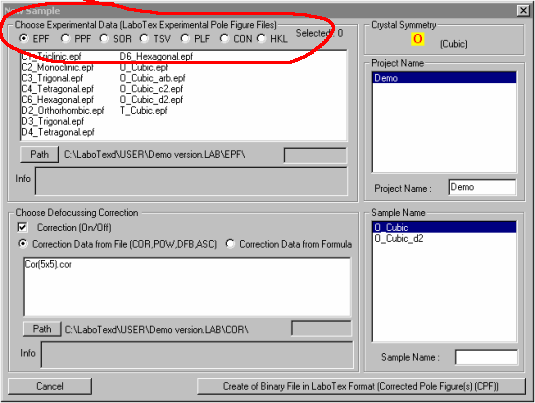
To make data format accessible for creation of CPF files you should:
- select EDIT menu in LaboTex
-
select LaboTex Options
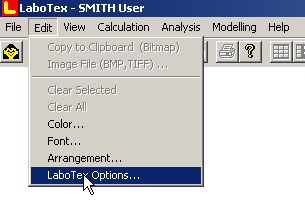
- select Data Formats
-
select name of format from selection windows 4 - 7 (LaboTex data formats1-3 can not be changed – they are fixed)
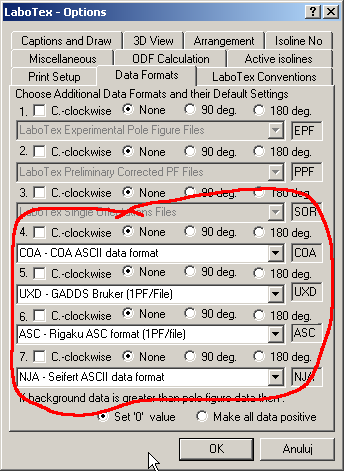
Example:
To make format PFG (RigakuASCII or binary data format) accessible for creation of CPF files you should:
- select EDIT menu in LaboTex
- select LaboTex Options
- select Data Formats
- select name of format from selection windows 4 or 5 or 6 or 7 : 'PFG' - RIST data formatfrom RIGAKU.
You can change default parameters for data format whenyou marked suitable checkbox or radio button: Now, when you open "New Sample"dialog window "PFG" format is accessible for user.
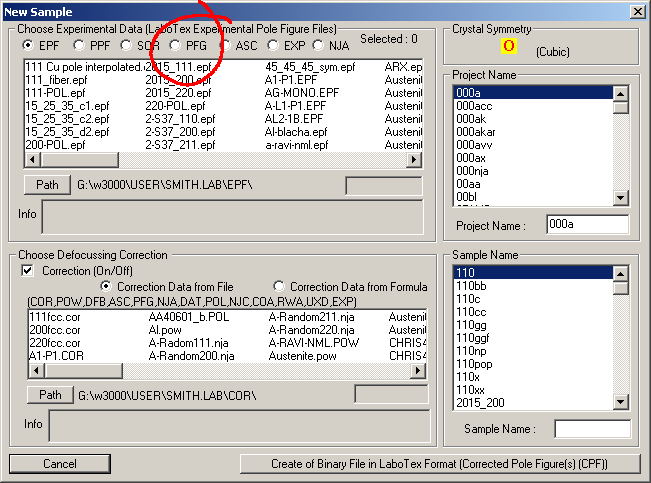
You may use simultaneously several files with datafor the same sample (!!!): in "New Sample" dialog box select (click mouse) several files simultaneously holding CTRL (control) key.
Selected files are marked by blue color (see for picture below). If you have files with corrected pole figures then youselect these files from "Choose ExperimentalData" list.
If you have files with non-corrected polefigures and files with data for defocussing and background correction thenplease make extension for all file(s) PFG (*.pfg). Files with backgroundcorrection data should have also add “_B” before file extension “.PFG” (froexample: ferrite_B.PFG). Next you can input data from following lists in 'NewSample' dialog:
For details see to report: 'Pole Figures: Plot and Registration Conventions'.
LaboTex can input data for different azimuthal and radial steps (azimuthal step is adjusted toradial step by linear interpolation).
Azimuthal step has to be in the range 1-10 deg., radial steps one from: 1. ,2.,1.2 ,1.25 ,1.5 ,2. ,2.5 ,3. ,3.75 ,5. ,6. , 7.5, 10. degrees and extra: 1.8,2.25 ,3.6 ,4.5 but with exceptions: trigonal and hexagonal crystal lattice symmetry.
Radial step for defocussing correction data has to be the same as for pole figures(!!!). Background should be measure in this same condition as pole figure.